⚡ SAFETY STACK · FREE WITH EVERY PACKAGE CONDUCTOR (auto-deploy) REASON (3-candidate think-first) PHOENIX (cascade recovery) DR-GUARD (region failover) NEVER BREAKS ANYTHING

HOW IT WORKS

Agentless. API-level. Zero footprint on your VMs.
Nothing installed on your servers. Nothing leaves your environment.
DEPLOYMENT ARCHITECTURE
TITAN AI connects via Azure APIs — we never touch your workloads
YOUR AZURE TENANT
YOUR VMs
Untouched
🗃
YOUR SQL
Untouched
📁
YOUR STORAGE
Untouched
🔒
YOUR KEY VAULT
Untouched
↑ READ-ONLY API CALLS ↑
Azure Resource Manager APIs · Microsoft Graph API · Azure Monitor API
TITAN AI CONTAINER (2 vCPU, 4 GB RAM)
SCOUT
Scan
SENTINEL
Assess
SHADOW
Detect
FORGE
Fix
COMPLY
Audit
+ WATCH + Healthcare + Banking + Telecom agents as needed
↓ REPORTS ↓
DASHBOARD
Azure Portal UI
COMPLIANCE REPORTS
19 Frameworks
EMAIL ALERTS
Real-Time
🚫
ZERO VMs DEPLOYED
We don't install agents on your servers. No software on your VMs. No sidecars. No kernel modules.
🔍
READ-ONLY BY DEFAULT
Azure Reader role only. We can see your resources but cannot change anything unless you explicitly enable auto-fix.
🔒
DATA STAYS WITH YOU
All scanning happens inside your Azure tenant. Reports are generated locally. No data is sent to external servers.
WHAT WE DEPLOY IN YOUR ENVIRONMENT
Just 2 lightweight Azure resources — no VMs, no VNets, no NSGs, no load balancers
RESOURCE TYPE PURPOSE COST
TITAN AI Container Azure Container Instance Runs all 25 agents (2 vCPU, 4 GB RAM) ~$30/mo
Managed Identity User-Assigned Identity Authenticates to your Azure APIs (Reader role) FREE
WHAT WE DO NOT DEPLOY
No Virtual Machines
No VNets or NSGs
No Load Balancers
No Software on VMs
STEP-BY-STEP ONBOARDING
From first call to first scan in under 30 minutes
1
SCHEDULE ONBOARDING CALL
Email info@titanai.tech or request a free audit.
We schedule a 30-minute onboarding call to understand your environment.
No sales pitch — we get straight to deployment.
2
CREATE SERVICE PRINCIPAL (5 MINUTES)
Your IT team runs one command in Azure CLI:
$ az ad sp create-for-rbac --role Reader --name titan-ai-scanner
This creates a read-only service principal with Reader role.
It gives us: Tenant ID, Client ID, Client Secret.
That's it. No VNets. No firewall rules. No network changes.
3
CHOOSE DEPLOYMENT METHOD
Option A — Azure Marketplace (Recommended)
Click "Create" in Azure Marketplace. Our ARM template auto-deploys a single container + managed identity into your subscription. One click. Under 5 minutes.

Option B — Manual Setup
We provide credentials via secure channel. Our container connects to your Azure APIs remotely using the service principal. Nothing deployed in your tenant.
4
CONFIGURE VERTICALS
Select which agents to activate based on your industry:

CLOUD SECURITY — Runs automatically. Scans all Azure resources via APIs.
HEALTHCARE — Connect Epic FHIR, Cerner, or CSV/database data sources.
BANKING — Connect transaction feeds, KYC databases, or test with demo data.
TELECOM — Connect billing systems, consent databases, or subscriber data.

Healthcare, Banking, and Telecom agents can run on demo data for evaluation before connecting to production systems.
5
FIRST SCAN — RESULTS IN 30 MINUTES
All 25 agents run their first scan.
SCOUT finds vulnerabilities → SENTINEL assesses attack surface → SHADOW detects shadow AI → COMPLY maps to 19 frameworks → FORGE generates fix plan.

You receive:
✔ Interactive HTML report with all findings
✔ Compliance gap analysis across 19 frameworks
✔ Cost savings opportunities identified
✔ Auto-remediation plan (requires your approval to execute)
6
ONGOING — DAILY SCANS + 24/7 MONITORING
After first scan, agents run daily automated scans.
WATCH agent monitors 24/7 for drift and new threats.
Email alerts for critical findings within 1 hour.
Self-learning AI gets smarter with every scan cycle.
Compliance reports available on-demand. Quarterly business reviews included with Enterprise tier.
PERMISSIONS REQUIRED
Minimal access. Maximum security.
MODE AZURE ROLE WHAT IT CAN DO WHAT IT CAN'T DO
SCAN MODE
(Default)
Reader Read VM configs, storage settings, NSG rules, SQL settings, Key Vault policies, Entra ID identities, activity logs Cannot modify, create, or delete any resources
FIX MODE
(Optional)
Contributor Everything in Reader + apply auto-fixes (disable public access, enforce HTTPS, enable encryption, remove dangerous NSG rules) Cannot manage RBAC roles or delete resource groups. All fixes require your approval first.
SHADOW
(NHI Audit)
Directory Reader
(Entra ID)
Read service principals, app registrations, managed identities, sign-in logs via Microsoft Graph API Cannot modify directory objects. Graph API calls are free — no additional cost.
INDUSTRY-SPECIFIC SETUP
Cloud Security connects automatically. Other verticals need a data source.
CLOUD SECURITY
Data Source: Azure APIs (automatic)
Setup: Service Principal + Reader role
Agents: SCOUT, SENTINEL, SHADOW, FORGE, COMPLY, WATCH
Time to First Scan: 5 minutes
Additional Cost: None — uses Azure APIs already included in your subscription
HEALTHCARE
Data Sources:
• Epic FHIR API (member data)
• Cerner FHIR API
• CSV upload (bulk import)
• Database connection (SQL/PostgreSQL)
Agents: ENGAGE, VOICE, PULSE, PREDICT, CODE
Can evaluate on demo data before connecting production systems
BANKING
Data Sources:
• Transaction feed API
• Core banking system export
• CSV upload (transaction batches)
• Database connection
Agents: AML, FRAUD, KYC
Can evaluate on demo data with realistic banking scenarios included
TELECOM
Data Sources:
• Billing system API
• Consent management database
• Subscriber data feed
• CSV/database upload
Agent: TELCO (15 capabilities, 50-state PUC)
Can evaluate on demo data with telecom compliance scenarios
TOTAL COST OF OWNERSHIP
Our fee + your Azure costs = your total investment. Full transparency.
HOW PRICING WORKS
You pay TITAN AI an annual subscription for the platform.
You pay Microsoft Azure for the small container that runs in your tenant.
That's it. No hidden fees. No per-user charges. No per-resource charges.
ENVIRONMENT SIZE AZURE RESOURCES TITAN AI FEE YOUR AZURE COST TOTAL / YEAR
Small ~50 resources
1 subscription
$14,999/yr ~$50/mo
($625/yr)
~$15,624
Medium ~250 resources
5 subscriptions
$49,999/yr ~$120/mo
($1,457/yr)
~$51,456
Large ~1,000 resources
20 subscriptions
$149,999/yr ~$170/mo
($2,048/yr)
~$152,047
Enterprise 5,000+ resources
100+ subscriptions
$199,999/yr ~$340/mo
($4,085/yr)
~$204,084
Banking AML + Fraud + KYC
Transaction feeds
$239,999/yr ~$340/mo
($4,085/yr)
~$244,084
WHAT'S IN YOUR AZURE COST?
~$30
CONTAINER INSTANCE
2 vCPU, 4 GB RAM
Runs all 25 agents
~$10
AI PROCESSING
Claude AI analysis
Per-scan intelligence
$0
EVERYTHING ELSE
Storage, Network, Key Vault
Graph API, Managed Identity
VS. COMPETITORS — TOTAL COST
ENVIRONMENT TITAN AI
(Fee + Azure)
WIZ PRISMA CLOUD DEFENDER P2 PEN TEST
FIRM
250 resources $51K/yr $50-100K/yr $45-90K/yr $15-45K/yr $60-200K/yr
1,000 resources $152K/yr $100-200K/yr $90-180K/yr $60-180K/yr $60-200K/yr
5,000+ resources $204K/yr $200-500K/yr $250-500K/yr $300-900K/yr $60-200K/yr
Competitors charge per resource. TITAN AI is flat-rate. As you grow, we stay the same price. They don't.
FREQUENTLY ASKED QUESTIONS
DO YOU INSTALL ANYTHING ON MY VMs?
No. TITAN AI is 100% agentless. We scan through Azure Resource Manager APIs. We never SSH into your servers, install packages, or deploy sidecars. Your VMs are completely untouched.
DOES MY DATA LEAVE MY ENVIRONMENT?
No. All scanning happens inside your Azure tenant. The TITAN AI container runs in YOUR subscription, using YOUR resources. The only external call is to Claude AI for intelligent analysis — only metadata and findings are sent (never raw customer data like PII, PHI, or credentials).
CAN YOU BREAK MY ENVIRONMENT?
Not in default Scan Mode. We only have Reader access — we literally cannot modify your resources. If you enable Fix Mode (optional), FORGE can apply auto-remediation, but every fix requires your explicit approval first. There's also a built-in rollback mechanism.
DO I NEED TO OPEN FIREWALL PORTS OR CREATE VNets?
No. TITAN AI communicates through Azure's management plane (ARM APIs), not through your data plane. No inbound ports, no NSGs, no VNet peering, no firewall rules needed.
HOW DO HEALTHCARE / BANKING / TELECOM AGENTS CONNECT?
Cloud Security agents connect automatically via Azure APIs. For Healthcare, Banking, and Telecom, you connect your data sources (Epic FHIR, transaction feeds, billing APIs) through our secure connector framework. You can also start with built-in demo data to evaluate before connecting production systems.
WHAT IS THE AZURE COST TO RUN TITAN AI?
About $30-50/month for the container instance plus $10-35/month for AI processing. Total Azure cost is typically under $100/month for most environments. Storage, networking, Key Vault, and Graph API calls are either free or pennies. The TITAN AI subscription fee is your primary cost — Azure infrastructure is negligible.
HOW FAST CAN WE GO LIVE?
Cloud Security: under 30 minutes from first call to first scan results. Healthcare/Banking/Telecom: typically 1-3 business days to connect data sources and configure agents. Azure Marketplace deployment is one-click — under 5 minutes.
SELF-SERVICE DEPLOYMENT GUIDE
Everything your IT team needs to deploy TITAN AI without our help. Copy-paste ready.
QUICK START — 3 STEPS
1
CREATE SERVICE PRINCIPAL
az ad sp create-for-rbac --role Reader --name titan-ai-scanner --scopes /subscriptions/{YOUR_SUB_ID}
Grants read-only access. Save the Tenant ID, Client ID, and Client Secret output.
2
CONFIGURE CREDENTIALS
cp .env.example .env
# Edit .env with your:
AZURE_TENANT_ID=...
AZURE_CLIENT_ID=...
AZURE_CLIENT_SECRET=...
ANTHROPIC_API_KEY=...
Paste the credentials from Step 1 into the .env file.
3
RUN TITAN AI
pip install -r requirements.txt
python titan.py
Opens web dashboard at http://localhost:5000. Select agents and run your first scan.
PREREQUISITES CHECKLIST
Python 3.8+
python --version to verify
Azure CLI
az --version to verify. Install: aka.ms/installazurecliwindows
Azure Subscription
Any subscription where you have Owner or User Access Administrator
Anthropic API Key
For AI-powered analysis. Get one at console.anthropic.com
4 AUTHENTICATION METHODS
TITAN AI tries each method in order. If one fails, it automatically falls back to the next. Your scan never fails due to auth.
1. SERVICE PRINCIPAL (RECOMMENDED)
Best for production. Create a dedicated identity with exact permissions.
# Create service principal with Reader role
az ad sp create-for-rbac \
  --role Reader \
  --name titan-ai-scanner \
  --scopes /subscriptions/{SUB_ID}

# Output (save these):
# "appId": "xxxxxxxx" ← AZURE_CLIENT_ID
# "password": "xxxxxxxx" ← AZURE_CLIENT_SECRET
# "tenant": "xxxxxxxx" ← AZURE_TENANT_ID
2. MANAGED IDENTITY (AZURE MARKETPLACE)
Zero config. Auto-detected when running in Azure Container Instances or VMs.
# No configuration needed!
# TITAN AI auto-detects Managed Identity
# when deployed via Azure Marketplace.

# Assign Reader role to the identity:
az role assignment create \
  --assignee {MANAGED_IDENTITY_ID} \
  --role Reader \
  --scope /subscriptions/{SUB_ID}
3. AZURE CLI (DEV / TESTING)
Fastest for testing. Uses your personal Azure login session.
# Login to Azure
az login

# Verify your subscription
az account show

# TITAN AI auto-detects your session
python titan.py
4. INTERACTIVE BROWSER (FALLBACK)
Last resort. Opens browser for SSO login. Works with any Azure AD tenant.
# If all other methods fail,
# TITAN AI opens your default browser
# for Azure AD authentication.

# Just sign in with your org credentials.
# MFA supported. SSO supported.
# Session cached for repeat scans.
AZURE PERMISSIONS MATRIX
MODE AZURE ROLE WHAT IT CAN DO WHAT IT CANNOT DO
SCAN
Default mode
Reader Read all resource configs, NSG rules, storage settings, SQL configs, Key Vault metadata, Entra ID info, activity logs Cannot modify, create, or delete any resource. Cannot change RBAC. Cannot access data inside resources.
FIX
Optional
Contributor Everything in SCAN + auto-remediation: enforce HTTPS, disable public access, fix NSG rules, enable encryption, enable auditing Cannot manage RBAC/role assignments. Cannot delete resource groups. Cannot access Key Vault secrets.
SHADOW / NHI
Optional
Directory Reader Microsoft Graph API: service principals, app registrations, sign-in logs, group memberships. Shadow AI tool detection. Cannot modify directory objects. Cannot reset passwords. Cannot change group memberships.
ALL 25 agents — WHAT THEY SCAN
AGENT TIER WHAT IT SCANS ROLE TIME
SCOUTCloudFull Azure infrastructure: VMs, SQL, Storage, Key Vaults, Disks, NSGs, App ServicesReader3 min
SENTINELCloudPenetration testing, port exposure, breach detection, DLP, vulnerability scanningReader4 min
SHADOWCloudShadow AI tools (100+), non-human identities, data exfiltration, license wasteDir Reader3 min
FORGECloudAuto-remediation: enforces HTTPS, disables public access, fixes NSG rules, enables encryptionContributor2 min
COMPLYAll19 compliance frameworks: HIPAA, HITRUST, NIST, SOC 2, PCI-DSS, CIS, CMMC, SOX, CCPA, moreReader3 min
WATCHCloud24/7 alert monitoring, coverage gaps, disabled alerts, missing notificationsReader2 min
AUDITAuditEvidence collection for HITRUST r2, PCI-DSS v4, SOC 2 Type II, HIPAA, FedRAMP, NISTReader3 min
ENGAGEHealthcareMember outreach optimization, engagement scoring, campaign effectivenessReader2 min
VOICEHealthcareCall QA automation, sentiment analysis, compliance keyword detectionReader2 min
PULSEHealthcareETL pipeline monitoring, data quality scoring, SLA trackingReader2 min
PREDICTHealthcareHealth outcome prediction, risk scoring, readmission probabilityReader2 min
AMLBankingAnti-money laundering: 13-phase analysis, SAR narrative generation, 95% false positive eliminationReader3 min
FRAUDBankingReal-time fraud detection: CNP, ATO, wire fraud, velocity checksReader2 min
KYCBanking16-phase CDD/EDD, PEP screening, adverse media, UBO identificationReader3 min
CODEEnterpriseCode security analysis, dependency scanning, secret detection in repositoriesReader3 min
TELCOEnterpriseTCPA consent, CPNI audit, FCC filing, STIR/SHAKEN, SIM swap, revenue leakage, churn predictionReader3 min
Total scan time (all 25 agents): ~22 minutes. Agents run in parallel pipeline. Only FORGE requires Contributor role. All other agents are read-only.
FULL DEPLOYMENT — STEP BY STEP
STEP 1 — INSTALL PREREQUISITES
# Install Python 3.8+ (if not already installed)
# Download from python.org or use your package manager

# Install Azure CLI
# Windows: winget install Microsoft.AzureCLI
# macOS: brew install azure-cli
# Linux: curl -sL https://aka.ms/InstallAzureCLIDeb | sudo bash

# Verify installations
python --version   # Should show 3.8+
az --version      # Should show 2.x
STEP 2 — CREATE AZURE SERVICE PRINCIPAL
# Login to Azure
az login

# Find your subscription ID
az account list --output table

# Create service principal (Reader = scan only, Contributor = scan + fix)
az ad sp create-for-rbac \
  --role Reader \
  --name titan-ai-scanner \
  --scopes /subscriptions/YOUR_SUBSCRIPTION_ID

# SAVE THIS OUTPUT:
# {
#  "appId": "abc123..."    ← This is your AZURE_CLIENT_ID
#  "password": "xyz789..." ← This is your AZURE_CLIENT_SECRET
#  "tenant": "def456..."  ← This is your AZURE_TENANT_ID
# }
STEP 3 — INSTALL TITAN AI & CONFIGURE
# Download TITAN AI (provided by your account manager)
# Unzip to a folder on your machine

# Install Python dependencies
cd titan-ai
pip install -r requirements.txt

# Create your configuration file
cp .env.example .env

# Edit .env with your credentials:
AZURE_TENANT_ID=your-tenant-id-from-step-2
AZURE_CLIENT_ID=your-client-id-from-step-2
AZURE_CLIENT_SECRET=your-secret-from-step-2
ANTHROPIC_API_KEY=your-anthropic-api-key
STEP 4 — RUN YOUR FIRST SCAN
# Start TITAN AI
python titan.py

# Output:
# TITAN AI starting on http://localhost:5000
# Azure authenticated: Pay-As-You-Go (sub-id)
# 25 agents loaded. Ready to scan.

# Open http://localhost:5000 in your browser
# Click "Run All Agents" or select individual agents
# Wait ~22 minutes for full scan
# Export report as HTML or PDF
STEP 5 — REVIEW FINDINGS & REMEDIATE
Your dashboard shows all findings sorted by severity (Critical → High → Medium → Low).
Each finding includes: resource name, location, compliance control violated, evidence, and exact remediation command.

To auto-fix: Upgrade the service principal to Contributor role and run TITAN FORGE.
To export: Click "Generate Report" for HTML/PDF with full evidence for auditors.
To schedule: Set up recurring scans (daily, weekly, monthly) for continuous monitoring.
TROUBLESHOOTING
"Authentication failed"
Verify .env credentials match az ad sp output. Run: az login --service-principal -u CLIENT_ID -p SECRET --tenant TENANT_ID
"AuthorizationFailed" on a resource
Service principal needs Reader role on that subscription. Run: az role assignment list --assignee CLIENT_ID
"No subscriptions found"
Check tenant ID is correct. Run: az account list --all to see all available subscriptions.
"API throttling" errors
TITAN AI has built-in retry logic with exponential backoff. If persistent, reduce parallel agent count in settings.
Need help? Email info@titanai.tech with your error output. We respond within 2 hours during business days.
READY TO SEE IT IN ACTION?
Free read-only scan. 30 minutes. No changes to your environment.
GET FREE AUDIT
or watch the interactive demo →
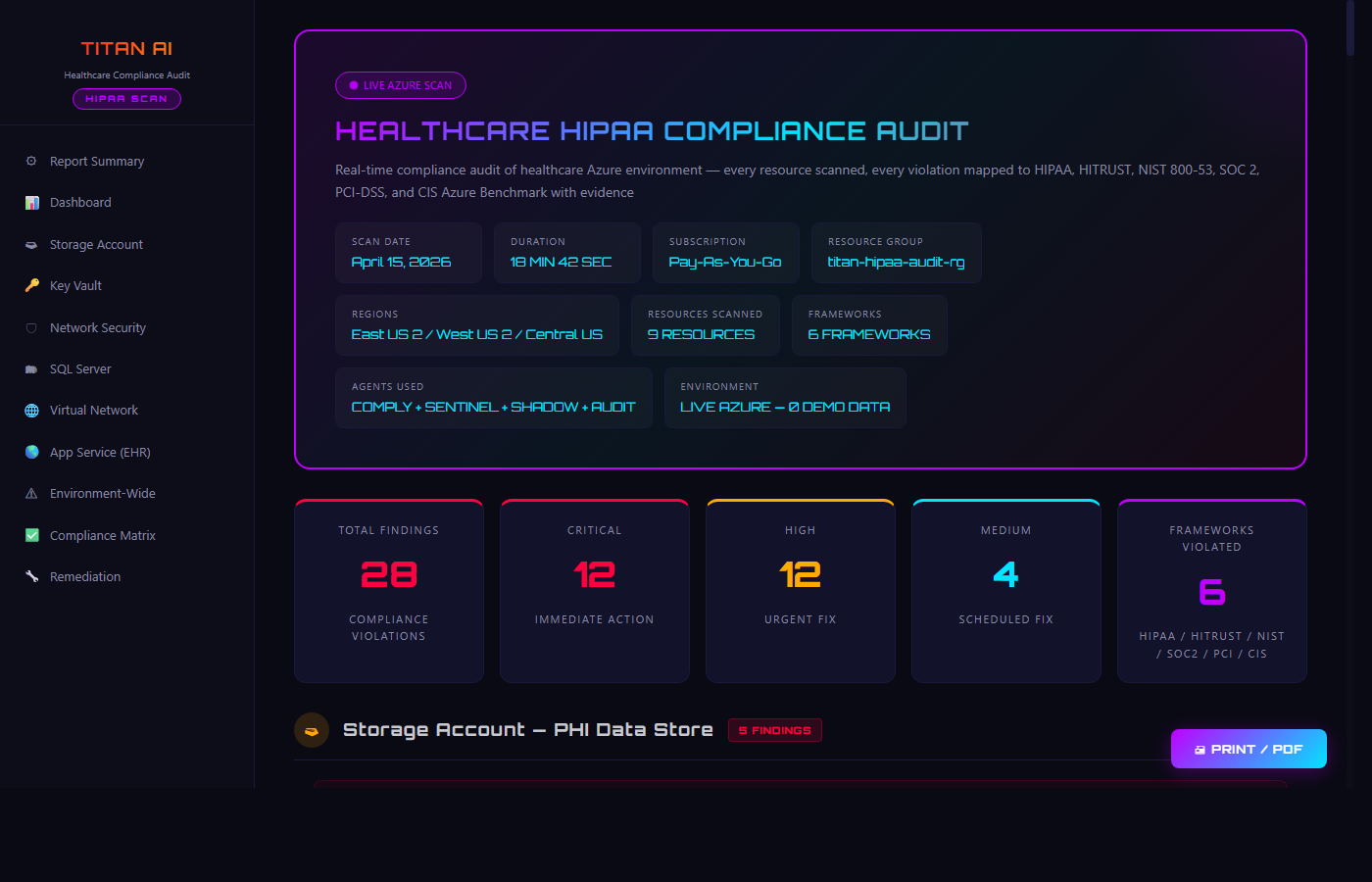
LIVE AZURE SCAN EVIDENCE
Real healthcare Azure environment scanned April 15, 2026. Per-resource evidence showing WHY each resource was flagged, which HIPAA/compliance rule it broke, and the exact remediation.
TITAN AI Healthcare HIPAA Compliance Audit Dashboard
HIPAA AUDIT DASHBOARD — 28 Compliance Violations • 12 Critical • 9 Resources Scanned • 6 Frameworks Violated
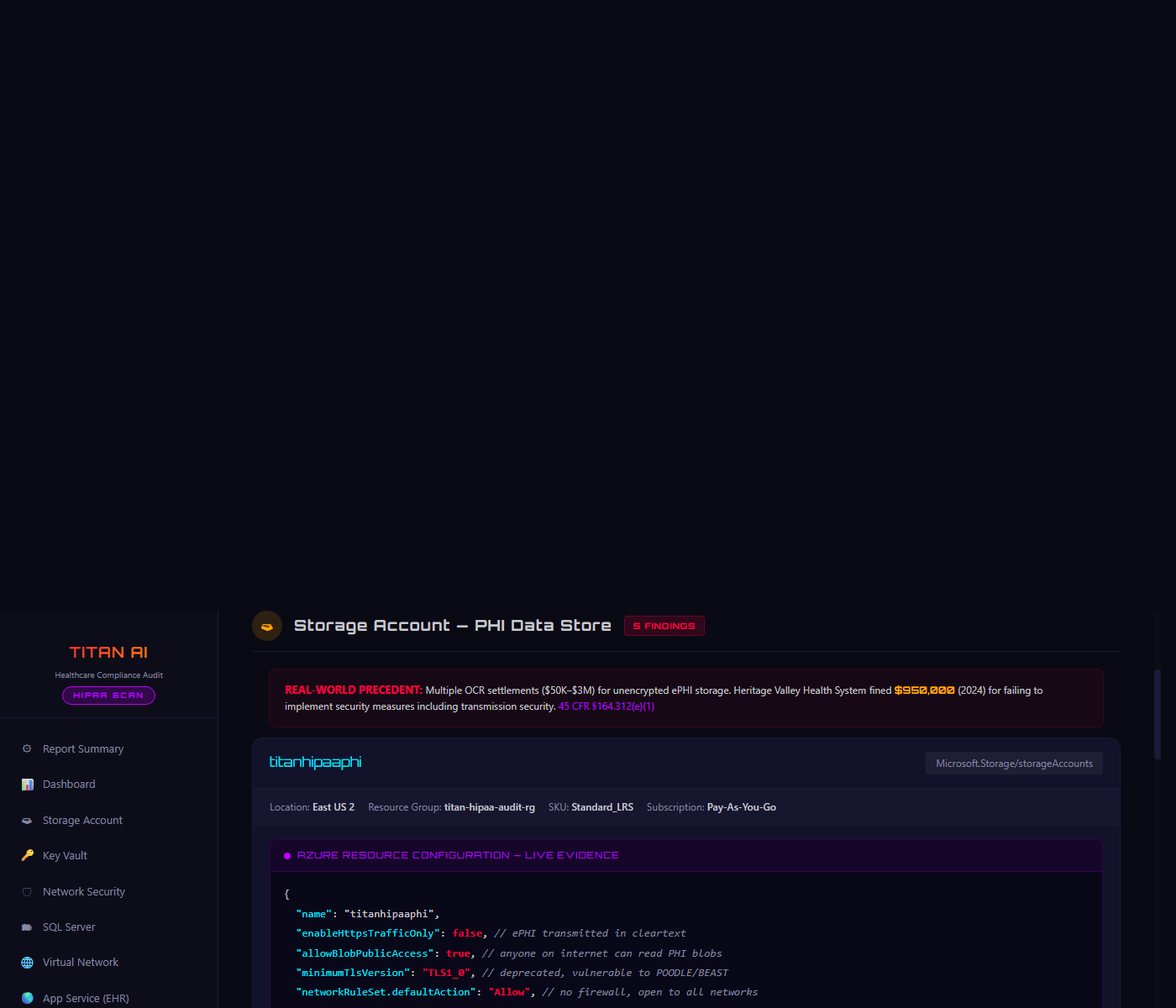
Storage Account PHI Data Store - Live Azure Config Evidence
STORAGE ACCOUNT PHI DATA STORE — enableHttpsTrafficOnly: false • allowBlobPublicAccess: true • TLS1_0 — 5 HIPAA Violations
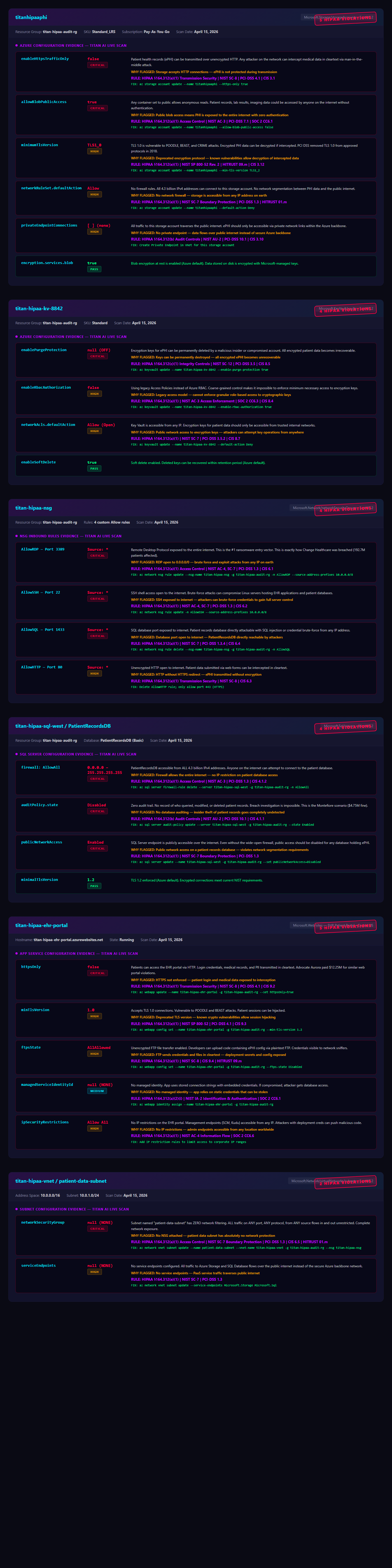
HIPAA Compliance Evidence
HIPAA COMPLIANCE — 28 Findings — 6 Frameworks — Storage, Key Vault, NSG, SQL, App Service, VNet
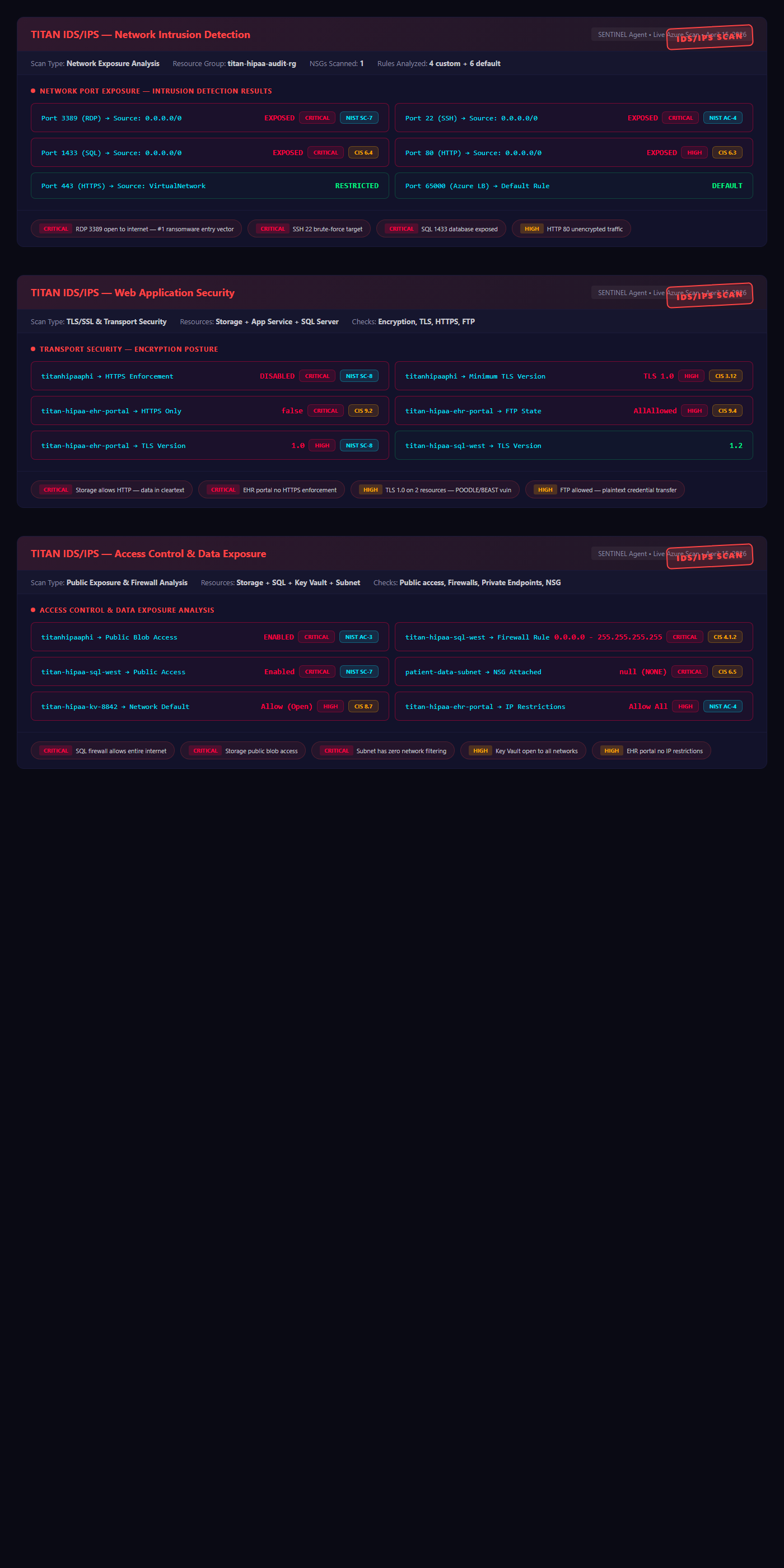
IDS/IPS Scanner Evidence
IDS/IPS SCANNER — Network Intrusion, Web App Security, Access Control & Data Exposure
VIEW FULL HIPAA REPORT DOWNLOAD PDF